

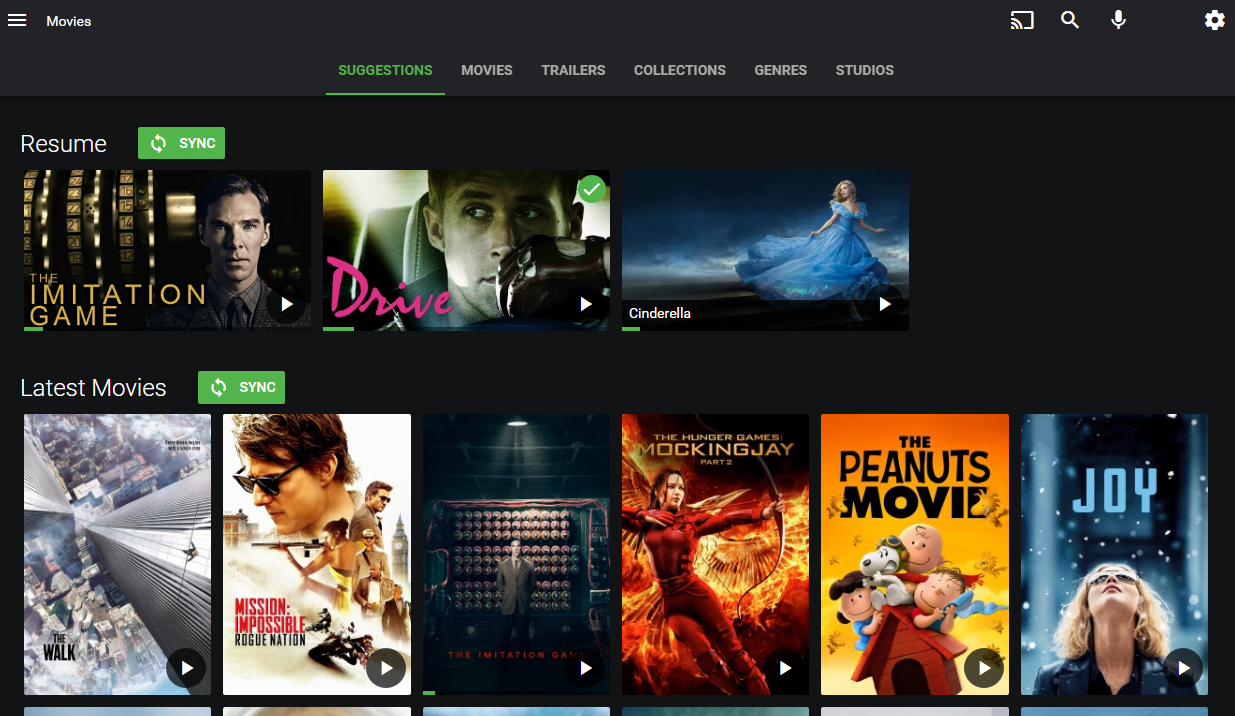
Emby Connect: The Complete 2025 Guide to Smart, Secure, and Seamless Streaming
In today’s digital world, entertainment isn’t about owning discs or downloading files anymore. It’s about instant access — anytime, anywhere. Streaming platforms like Netflix, Hulu, and Disney+ have changed how we watch TV and movies. But what if you want that same streaming convenience for your own media collection — your personal library of movies, shows, music, and photos?
That’s where Emby comes in. And at the heart of Emby’s power lies a simple yet revolutionary feature — Emby Connect.
In this comprehensive 2025 guide, we’ll explore everything you need to know about Emby Connect — what it is, how it works, how to set it up, and why it’s becoming the go-to tool for personal media streaming enthusiasts worldwide. Whether you’re a complete beginner or an experienced home media server user, this guide will walk you through every detail in plain, easy-to-follow language.
What Is Emby Connect?
Emby Connect is the feature that makes Emby truly cloud-connected. In short, it’s Emby’s solution for secure, remote access to your personal media server — without the technical hassle of configuring port forwarding, VPNs, or dynamic DNS.
Traditionally, when you wanted to stream your personal media library away from home, you had to manually open ports on your router and connect via IP addresses. This was complicated, insecure, and prone to errors. Emby Connect simplifies that.
Here’s how it works:
-
You create an Emby account (free).
-
You link your Emby Server to that account.
-
Emby Connect securely handles authentication and connection between your account and your media server.
That means you can access your media library anywhere in the world, just by logging in with your Emby account. No need to remember IP addresses or change router settings.
It’s like having your own private Netflix — but fully controlled by you.
The Philosophy Behind Emby Connect
Emby was designed for users who value control, privacy, and customization. While mainstream streaming services dictate what you can watch and when, Emby puts you in charge.
The idea behind Emby Connect is to bridge local control with cloud convenience. You store your own files, manage your server locally, and still enjoy cloud-like access from any device, anywhere.
This blend of local ownership + global accessibility makes Emby Connect a powerful solution for home media enthusiasts.
Why Use Emby Connect in 2025
There are several reasons why Emby Connect continues to grow in popularity among streamers in 2025:
1. Easy Remote Access
No need to deal with complicated network setups or static IPs. Just log in and stream your content remotely — whether you’re traveling, at work, or visiting family.
2. Centralized Login
If you manage multiple servers or share access with friends, Emby Connect simplifies the process with a single global account.
3. Improved Privacy
Unlike Plex, which uses cloud relays by default, Emby Connect focuses on user-managed servers. Your data stays yours. The cloud only helps with authentication, not streaming.
4. Multi-Device Support
Emby runs on nearly everything: Smart TVs, Firestick, Android, iOS, Roku, and even browsers. Emby Connect allows you to log in on any of them instantly.
5. User Sharing Made Simple
Want to share your server with friends or family? You can easily invite them via Emby Connect. They log in with their own accounts, keeping everything organized and secure.
How to Set Up Emby Connect (Step-by-Step)
Setting up Emby Connect takes only a few minutes, and once done, it makes your entire streaming experience effortless.
Step 1: Create an Emby Account
-
Go to https://app.emby.media
-
Click Sign Up
-
Enter your email, password, and verify your account
This account acts as your identity for Emby Connect — similar to a Google account for Android.
Step 2: Install and Set Up Emby Server
If you haven’t already:
-
Download Emby Server from the official site: https://emby.media
-
Install it on your preferred device (Windows, macOS, Linux, or NAS)
-
Launch the server dashboard (usually at
http://localhost:8096) -
Add your media libraries (Movies, TV Shows, Music, etc.)
Step 3: Link Your Emby Server to Emby Connect
-
In the Emby Server Dashboard, go to Users → My Profile
-
Click Emby Connect
-
Enter your Emby account credentials
-
Click Link Account
Your server is now connected to your Emby Connect profile.
Step 4: Access Your Server Anywhere
To test:
-
Visit app.emby.media
-
Log in with your Emby account
-
Your linked server should appear automatically
-
Click and start streaming your personal collection!
How Emby Connect Works (Behind the Scenes)
While Emby Connect feels simple on the surface, it’s powered by clever networking technology.
When you log in:
-
Emby’s central server authenticates your account.
-
It matches your credentials to your linked Emby Server.
-
It establishes a secure path between your device and your home server — either directly or through Emby’s relay if necessary.
This ensures a fast, encrypted, and reliable connection — without the need for manual setup.
It’s the same concept big streaming services use, but here you remain the owner of your data and server.
Emby Connect vs Plex and Jellyfin
If you’ve researched Emby, you’ve likely come across Plex and Jellyfin, two major alternatives. Here’s how Emby Connect compares.
1. Emby vs Plex
Plex is often seen as the “mainstream” choice, while Emby appeals more to those who want control.
-
Privacy: Emby offers better transparency. Plex relays more metadata and sometimes shares usage data.
-
Customization: Emby allows deep customization of libraries, metadata, and user interfaces.
-
Emby Connect vs Plex Remote Access: Plex handles remote access automatically, but Emby Connect offers more security and independence — no mandatory cloud dependency.
2. Emby vs Jellyfin
Jellyfin is an open-source fork of Emby.
-
Emby Connect: Jellyfin doesn’t have an equivalent — users must manually configure remote access.
-
Support & Features: Emby offers premium features like mobile sync, parental controls, and easier multi-user management.
-
Ease of Use: Emby strikes the perfect balance between open flexibility and user-friendly simplicity.
In short:
-
Use Plex if you want automation and don’t mind less control.
-
Use Jellyfin if you prefer total open-source freedom.
-
Use Emby Connect if you want security, simplicity, and ownership.
Key Features of Emby Connect
Let’s highlight what makes Emby Connect stand out in 2025:
-
Cloud-Linked Login – Access your servers with one central account.
-
Secure Sharing – Add family or friends without giving them local credentials.
-
Instant Access – No need for IP addresses or dynamic DNS.
-
Cross-Device Streaming – Log in from Smart TVs, mobile devices, or browsers.
-
Account Management – Control who accesses what, using user roles.
-
Privacy by Design – Only authentication happens in the cloud; media stays on your server.
Advanced Tips for Power Users
Once you’re comfortable with the basics, you can take Emby Connect even further:
1. Multiple Servers, One Account
Link multiple servers under one Emby Connect profile. Perfect if you manage separate servers for movies, TV, or family content.
2. Invite External Users
Using the “Add User” option in your server dashboard, you can share access safely with others through their Emby Connect accounts.
3. Combine with Emby Premiere
Emby Premiere unlocks advanced features like offline downloads, cinema mode, and hardware transcoding — making Emby Connect even smoother.
4. Secure Your Server
Always use HTTPS and keep your server updated. Even though Emby Connect is secure, local security is essential for best performance.
5. Use Emby Apps
For the best experience, download official Emby apps from your device’s store — they’re optimized for Connect login and playback.
Common Issues and Fixes
Even with a great setup, you might occasionally face connection hiccups. Here are a few common ones:
| Problem | Cause | Solution |
|---|---|---|
| Server Not Appearing | Not linked to Emby Connect | Re-link in Server Dashboard |
| Slow Remote Playback | Poor upload speed or transcoding issue | Enable hardware acceleration |
| Login Errors | Wrong account or outdated version | Update app and reauthenticate |
| Playback Buffering | Network congestion | Reduce video bitrate in playback settings |
Is Emby Connect Free?
Yes, Emby Connect is completely free to use. You only need a free Emby account.
However, advanced features like mobile sync, cinema intros, or live TV DVR require a Emby Premiere subscription. But the Connect functionality itself — linking, remote access, and user management — costs nothing.
Security and Privacy: Why Emby Connect Is Safer
Privacy is one of Emby’s biggest strengths. Unlike cloud media platforms, Emby doesn’t host or monitor your content. All your movies, shows, and photos remain stored on your personal device.
When using Emby Connect:
-
The authentication happens through Emby’s cloud service.
-
The actual streaming connection occurs directly between you and your server.
-
Media never passes through Emby’s servers.
In 2025, where online privacy matters more than ever, Emby Connect’s architecture stands out as both secure and transparent.
Emby Connect in the Modern Smart Home
Emby isn’t just for movie collectors anymore. With smart homes becoming more integrated, Emby Connect fits perfectly into a multi-device lifestyle.
You can:
-
Stream movies to your smart TV.
-
Access family photos on tablets.
-
Play music on your smart speakers.
-
Sync content across your mobile devices.
All with one login — Emby Connect.
Emby Connect: Pros and Cons
Pros:
-
Simple and secure remote access
-
Works across devices and platforms
-
No port forwarding needed
-
Strong privacy control
-
Easy sharing with family and friends
Cons:
-
Some advanced features require Emby Premiere
-
Setup can confuse absolute beginners
-
Relies on your home server’s uptime and bandwidth
The Future of Emby Connect
As of 2025, Emby is expanding its ecosystem faster than ever. Upcoming updates are expected to include:
-
Enhanced Connect stability
-
Deeper integration with mobile apps
-
Faster server discovery
-
More advanced user management tools
With the growing importance of self-hosted media, Emby Connect is positioned as a future-proof bridge between local control and global convenience.
Frequently Asked Questions (FAQs)
Q1: Can I use Emby Connect without Emby Premiere?
Yes, Emby Connect itself is free. Premiere is optional for advanced features.
Q2: Can multiple users access the same server through Emby Connect?
Absolutely. You can invite family or friends, each with their own Emby Connect account.
Q3: Does Emby Connect work on Firestick or Android TV?
Yes. Install the Emby app, log in with your Emby Connect credentials, and you’re good to go.
Q4: Is Emby Connect safe?
Yes. Your data never leaves your server; Emby’s servers only handle authentication securely.
Q5: Can I link more than one Emby Server?
Yes. You can link multiple servers to your single Emby Connect account and switch between them easily.
Conclusion: Emby Connect Is the Future of Personal Streaming
As we move deeper into the streaming age, Emby Connect represents the perfect balance between freedom, security, and simplicity. It takes the complexity out of managing a home media server and turns it into a sleek, cloud-powered experience — without losing your data sovereignty.
If you value privacy, customization, and the ability to access your personal media anywhere, Emby Connect is a must-have in 2025.
Whether you’re building a home entertainment hub or simply want a smarter way to access your media on the go, Emby Connect bridges the gap between your local content and a truly connected streaming world.
