

IPTV App for Firestick 2025
IPTV App for Firestick – Best Apps & Setup Guide for 2025
Streaming TV has completely changed the way people watch entertainment. Instead of paying for expensive cable or satellite packages, more viewers are turning to IPTV apps on Firestick for a cheaper, smarter, and more flexible way to enjoy live TV, movies, and sports.
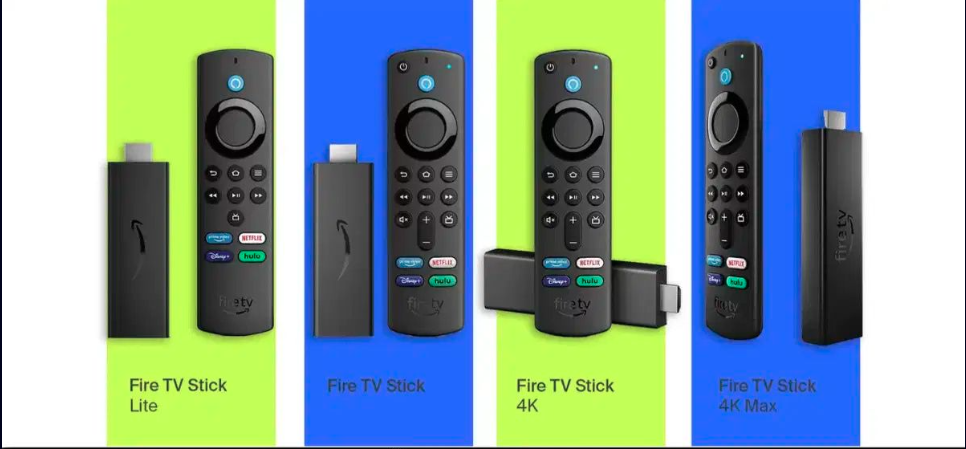
In 2025, the Amazon Firestick is still one of the most popular streaming devices worldwide. It’s affordable, portable, and easy to use, which makes it perfect for IPTV apps. But with so many options available, which apps are the best? And how do you set them up?
This complete guide will walk you through:
-
✅ What IPTV apps are
-
✅ Why Firestick is perfect for IPTV in 2025
-
✅ The best IPTV apps for Firestick this year
-
✅ Step-by-step setup instructions
-
✅ Troubleshooting tips and FAQs
What Is an IPTV App for Firestick?
IPTV (Internet Protocol Television) means watching TV channels and video content delivered through the internet, instead of traditional cable or satellite signals.
An IPTV app for Firestick is simply software you install that allows you to connect to IPTV services. These apps don’t usually provide content themselves. Instead, they act as a player or gateway, where you load your IPTV subscription or playlist.
Most IPTV apps on Firestick support:
-
M3U playlists
-
Xtream Codes API logins
-
EPG (Electronic Program Guide) for TV schedules
-
On-demand libraries (VOD)
Why Firestick + IPTV Is a Perfect Match in 2025
If you’re wondering why so many people use Firestick for IPTV, here are the top reasons:
-
💡 Affordable – A Firestick costs much less than a smart TV or streaming box.
-
💡 Portable – You can carry it anywhere and plug it into any TV with HDMI.
-
💡 User-friendly – Firestick apps are remote-friendly and easy to navigate.
-
💡 Supports 4K & HDR – Ideal for high-quality IPTV streams.
-
💡 Huge app library – Almost all IPTV players are compatible with Firestick.
Best IPTV Apps for Firestick in 2025
Here are the top-rated IPTV apps worth installing this year.
1. IPTV Smarters Pro
-
Beginner-friendly with a simple interface
-
Supports Xtream Codes, M3U playlists, and catch-up
-
Built-in video player + external player support
-
Free version available; premium upgrade adds features
2. TiviMate
-
Considered the premium IPTV player
-
Beautiful, cable-like interface
-
Playlist management and EPG
-
Supports recording and multi-screen viewing
-
Paid subscription needed for full features
3. Flix IPTV
-
Works with a one-time activation fee
-
Smooth performance on Firestick
-
Subtitle support + parental controls
-
Multi-language interface
-
Affordable long-term option
4. XCIPTV Player
-
Comes with two built-in media players (Exo & VLC)
-
Easy to set up with any IPTV service
-
Supports live TV, VOD, and catch-up
-
Lightweight app, works well on all Firestick models
5. OTT Navigator
-
Best for advanced users
-
Offers filters, sorting, and channel grouping
-
DVR, timeshift, and picture-in-picture support
-
Highly customizable interface
-
May take time to set up properly
How to Set Up IPTV Apps on Firestick (Step-by-Step)
Here’s how you can install and use IPTV apps on your Firestick in 2025:
Step 1: Prepare Firestick
-
Go to Settings > My Fire TV > Developer Options.
-
Enable Apps from Unknown Sources.
Step 2: Install Downloader App
-
Search for Downloader in the Amazon App Store.
-
Install and open it.
Step 3: Download IPTV App
-
Enter the IPTV app’s APK link inside Downloader.
-
Install once the file downloads.
Step 4: Set Up Your IPTV Service
-
Open the IPTV app.
-
Enter your M3U playlist URL or Xtream Codes login.
-
Wait for channels and VOD to load.
-
Start streaming live TV and movies! 🎬
Tips for the Best IPTV Streaming Experience
-
✅ Use a VPN to protect your privacy and bypass geo-blocks.
-
✅ Ensure 20 Mbps+ internet speed for HD, 50 Mbps+ for 4K.
-
✅ Keep your IPTV app updated for smoother performance.
-
✅ Pair with an external video player (like VLC or MX Player) if needed.
Troubleshooting Common IPTV Issues
-
Buffering? → Check Wi-Fi speed or switch to wired connection.
-
Playlist not loading? → Recheck your IPTV subscription details.
-
App crashing? → Clear app cache or reinstall.
-
Channels missing? → Contact your IPTV provider.
FAQs: IPTV on Firestick in 2025
Q1: Are IPTV apps free on Firestick?
Some apps are free, but most require a subscription or activation fee.
Q2: Is IPTV legal?
The apps themselves are legal. Legality depends on the source of the content. Stick with legitimate providers.
Q3: Can I use multiple IPTV apps on Firestick?
Yes, you can install and switch between different apps.
Q4: Do I need a VPN?
Yes, a VPN is strongly recommended for security, privacy, and smoother streaming.
Final Thoughts
In 2025, IPTV apps on Firestick are the ultimate way to enjoy live TV, sports, and movies without paying for expensive cable.
-
If you’re a beginner → IPTV Smarters Pro is the best choice.
-
If you want a premium, cable-like experience → TiviMate is unmatched.
-
For a budget-friendly, one-time payment → Flix IPTV is a solid option.
-
If you want customization → OTT Navigator is perfect.
No matter which app you choose, combining IPTV with Firestick gives you affordable, flexible, and high-quality streaming in 2025.
