

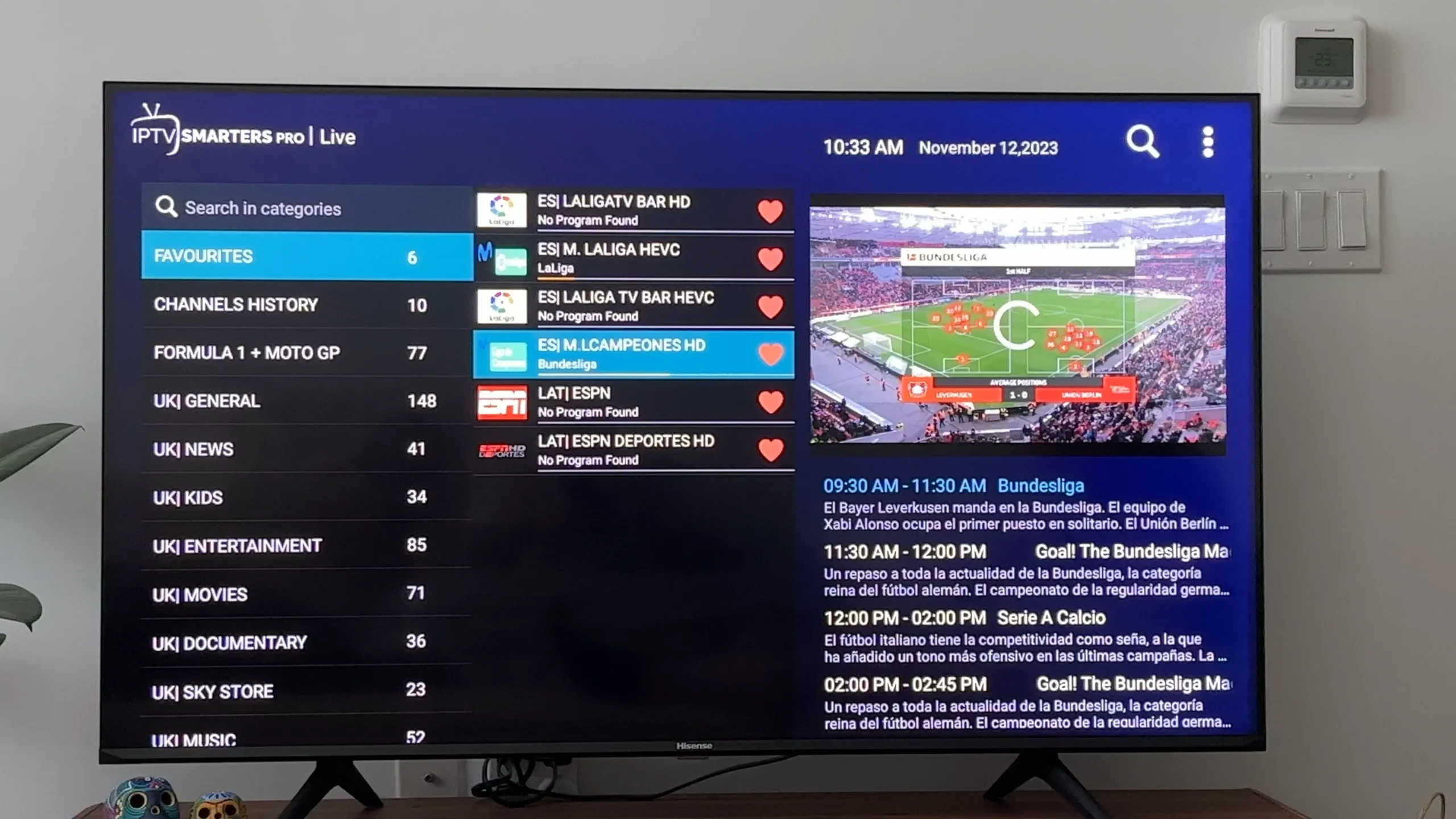
IPTV Smarters Pro: The Complete 2025 Guide to Features, Setup, Benefits & Best Practices
Introduction: What Is IPTV Smarters Pro?
In the fast-moving world of digital streaming, IPTV Smarters Pro has become one of the most recognized and widely used IPTV player apps. Unlike traditional cable or satellite TV, IPTV (Internet Protocol Television) delivers content over the internet. However, the IPTV Smarters Pro app is not a content provider—it is strictly a media player that allows users to integrate, manage, and stream their legally obtained IPTV subscriptions conveniently in one interface.
With its polished design, multi-platform compatibility, advanced EPG (Electronic Program Guide) integration, parental controls, multi-screen support, and strong playback performance, IPTV Smarters Pro has established itself as one of the go-to solutions for streaming enthusiasts around the world.
This long-form guide explores everything you need to know about IPTV Smarters Pro in 2025—features, setup processes, compatibility, benefits, troubleshooting, alternatives, and important legal notes. Whether you’re a beginner or an experienced streamer, this comprehensive guide aims to help you take full advantage of this powerful IPTV player.
1. Understanding IPTV Smarters Pro
Before diving deeper, you need to understand what this app actually does. IPTV Smarters Pro is primarily:
✅ An IPTV Player
✅ A media management interface
✅ A tool to organize and stream IPTV content legally
✅ A multi-device software solution
It is not:
❌ A content provider
❌ A streaming service
❌ A source of free channels, movies, or sports
❌ A replacement for a legal IPTV subscription
Users must provide their own valid IPTV playlist or subscription credentials from a licensed IPTV provider.
2. Key Features of IPTV Smarters Pro
In 2025, IPTV Smarters Pro continues to evolve, offering a robust set of features that appeal to both casual and advanced users. Below are its standout functionalities.
2.1. Intuitive and Modern User Interface
The interface is clean, responsive, and organized into clear categories like:
-
Live TV
-
Movies
-
Series
-
Catch-Up TV
-
Multi-Screen
-
Settings
-
Parental Controls
The dashboard layout is designed to work seamlessly across mobile, TV, and desktop environments.
2.2. Multi-Screen and Multi-User Support
One of the most impressive features is the ability to support:
✅ Multiple user profiles
✅ Multi-screen playback
✅ Multiple IPTV subscriptions
This makes IPTV Smarters Pro perfect for:
-
Families
-
Shared devices
-
Users who manage more than one IPTV service
2.3. Built-in IPTV Player With Advanced Decoders
The app supports:
-
Native video player
-
VLC player integration (on some versions)
-
HW and SW decoding
-
4K and 60fps playback (device dependent)
This ensures smooth streaming even at higher resolutions, assuming your internet connection can handle it.
2.4. Electronic Program Guide (EPG)
IPTV Smarters Pro offers full support for XMLTV EPG formats, allowing viewers to enjoy:
-
Channel schedules
-
Program descriptions
-
Automatic time-zone adjustment
-
Catch-up TV (when provided by IPTV service)
This elevates the experience from simple streaming to full TV-like navigation.
2.5. On-Demand Streaming (VOD & Series)
For IPTV services that offer VOD, IPTV Smarters Pro supports:
-
VOD movie sections
-
TV series with seasons and episodes
-
Resume playback
-
Subtitles and audio tracks
It organizes everything cleanly, almost like a Netflix-style interface.
2.6. Parental Controls
Parents can lock certain categories with a PIN, including:
-
Adult channels
-
Specific groups
-
Entire categories like movies or series
Perfect for homes with children.
2.7. Multi-Platform Support
IPTV Smarters Pro works on almost all modern devices:
-
Android phones & tablets
-
iOS devices
-
Samsung & LG smart TVs
-
Android TV & Google TV
-
FireStick & Fire TV
-
Windows & MacOS
-
Smart TV boxes
-
Nvidia Shield
This universal compatibility is one of its biggest advantages.
2.8. VPN Compatibility
IPTV Smarters Pro works smoothly with most VPN apps, improving:
-
Privacy
-
Security
-
Geo-blocking flexibility
Many users combine IPTV Smarters Pro with a VPN for safer streaming, especially on public networks.
2.9. Download & Offline Support (on some versions)
Some versions include options to download content—depending on the IPTV provider’s permissions.
3. How to Install IPTV Smarters Pro on Different Devices
Let’s break down installation by platform.
3.1. Android Phones & Tablets
-
Open Google Play Store
-
Search for “IPTV Smarters Pro”
-
Tap Install
-
Launch the app
-
Enter your IPTV service credentials (M3U URL, username/password, or API/Xtream Codes)
3.2. iPhone & iPad
-
Go to the App Store
-
Search “Smarters Player Lite”
-
Install
-
Log in with your IPTV subscription details
(Note: Apple policies changed the app naming, but functionality remains similar.)
3.3. FireStick & Fire TV
The app may require sideloading:
-
Enable “Apps from Unknown Sources”
-
Install Downloader
-
Enter the IPTV Smarters Pro download URL provided by the developer
-
Install and open
-
Login with IPTV credentials
3.4. Smart TVs (Samsung & LG)
Samsung Store → “IPTV Smarters Pro”
LG Content Store → “Smarters Player”
Login the same way with your IPTV subscription.
3.5. Windows & Mac
Download directly from the official IPTV Smarters website:
-
Install the desktop app
-
Enter login details
-
Use with keyboard, mouse, or remote (if supported)
4. How to Set Up IPTV Smarters Pro
After installing the app, the setup process is straightforward.
4.1. Choose Login Method
You can log in using:
✅ 1. Xtream Codes API
Most recommended method.
✅ 2. M3U Playlist URL
Simplest method but less advanced.
✅ 3. Username & Password Login
Dependent on your IPTV provider.
✅ 4. Local Playlist Upload
If you have an M3U uploaded from a device.
4.2. Enter Provider Credentials
You’ll typically enter:
-
Server URL
-
Username
-
Password
-
Playlist name
Once logged in, the app syncs:
-
Channels
-
Categories
-
EPG
-
VOD content
-
Series playlists
4.3. Customize Your Interface
You can modify:
-
Themes
-
Screen layout
-
Channel groups
-
Parental lock settings
-
Player settings
-
Multi-screen configurations
5. Benefits of IPTV Smarters Pro
The app’s popularity comes from a combination of usability, compatibility, and advanced streaming options.
5.1. Centralized Streaming
With IPTV Smarters Pro, users can manage:
-
Multiple IPTV accounts
-
Multiple playlists
-
Live TV + VOD + Series
-
Catch-up programs
-
Recorded content
All in one professional dashboard.
5.2. Easy Navigation
Even beginners can use:
-
EPG-based browsing
-
Category filters
-
Favorites list
-
Most-recently-watched features
The interface is user-friendly and organized.
5.3. Powerful Playback Engine
Supports:
-
1080p & 4K playback
-
HDR (device dependent)
-
Smooth frame rates
-
Multiple audio tracks
-
Clean subtitles
A big improvement over older IPTV apps.
5.4. Regular Updates
The developers update the app frequently with:
-
Interface upgrades
-
Bug fixes
-
Security improvements
-
New features
5.5. Enhanced Parental Controls
Ensures safer usage for families with children.
6. IPTV Smarters Pro vs Competitors
How does it compare to similar apps?
6.1. IPTV Smarters Pro vs TiviMate
TiviMate advantages:
-
Better EPG customization
-
Better recording functionality
IPTV Smarters advantages:
-
Cross-platform support
-
Built-in multi-screen
-
Better interface for VOD
6.2. IPTV Smarters Pro vs OTT Navigator
OTT Navigator is highly customizable, but Smarters is easier to use and supports more platforms.
6.3. IPTV Smarters Pro vs Smart IPTV (SIPTV)
Smart IPTV requires a one-time activation fee, while Smarters Pro offers more rich features free.
7. Common Problems and Solutions
7.1. App Not Loading Channels
Possible causes:
-
Wrong login details
-
Provider server issues
-
Playlist formatting errors
Solution: Recheck your subscription URL or credentials.
7.2. Buffering Issues
Causes:
-
Slow internet speed
-
High-quality streaming on low bandwidth
-
Unstable WiFi
Solutions:
-
Use ethernet instead of WiFi
-
Lower streaming quality
-
Restart your modem/router
7.3. Missing EPG
Ensure your IPTV provider supports XMLTV EPG and has supplied the correct EPG link.
7.4. Audio/Video Sync Problems
Try:
-
Switching decoders (HW → SW)
-
Changing playback engine
-
Restarting the app
8. Safety and Legal Considerations
IPTV Smarters Pro is completely legal software. What matters is how you use it.
✔ Using it with licensed IPTV providers is legal.
✘ Using it to access pirated IPTV services is illegal in many countries.
Always ensure your IPTV subscription:
-
Is licensed
-
Has distribution rights
-
Provides legal content
This avoids legal, privacy, and security risks.
9. Who Should Use IPTV Smarters Pro?
This app is perfect for:
✅ Families
✅ Travelers
✅ Cord-cutters
✅ Smart TV owners
✅ Users with multiple IPTV subscriptions
✅ People who want a customizable interface
✅ Streaming enthusiasts
Its simplicity and flexibility make it one of the best IPTV players available today.
10. Advanced Tips for Better IPTV Smarters Experience
10.1. Use a High-Speed Connection
For 4K content, you need at least:
-
25 Mbps stable download
-
Preferably wired ethernet
10.2. Keep the App Updated
Updating ensures:
-
Security
-
Performance stability
-
New features
10.3. Use VPN for Privacy
A VPN can:
-
Protect your IP
-
Prevent throttling
-
Increase privacy
10.4. Organize Favorite Channels
Create favorite lists to access your preferred content quickly.
10.5. Enable Catch-Up (If Available)
Useful for:
-
Missed TV shows
-
Rewatching episodes
-
Reviewing live sports highlights
Conclusion: Is IPTV Smarters Pro Worth It in 2025?
Absolutely. IPTV Smarters Pro continues to be one of the best and most versatile IPTV players available today. Its clean interface, multi-device support, strong playback engine, and advanced features make it ideal for anyone looking for a centralized, reliable IPTV experience.
However, always remember:
✅ The app itself is legal
✅ You must use it with legal IPTV services only
With the right IPTV provider, IPTV Smarters Pro becomes a powerful tool that transforms your TV viewing experience—offering live TV, movies, series, catch-up, multi-screen playback, and more in a single polished platform.
If you want a modern, flexible, and easy-to-use IPTV player for your home or office, IPTV Smarters Pro remains one of the top choices today.
