

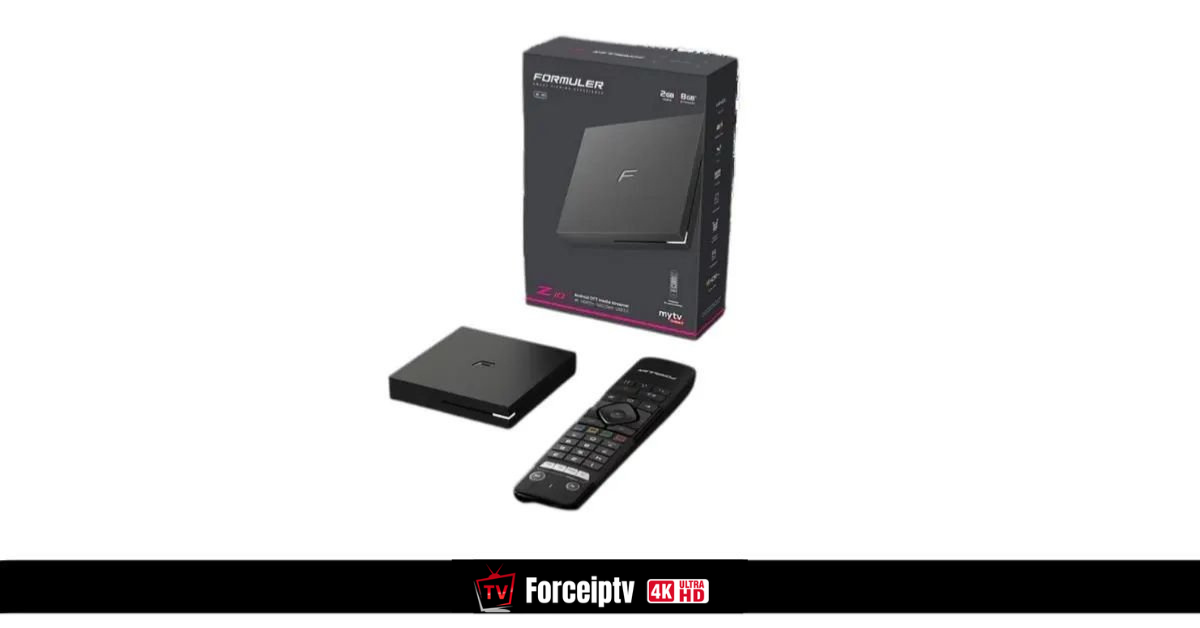
Formuler Box
How to Set Up IPTV on FormulerZ8 Using MYTV Online 2
FormulerZ boxes are some of the best devices available for watching IPTV. One of their standout features is the support for both MAC-based Portal Systems and M3U-based Playlists.
The FormulerZ8 is the latest version of these devices and comes pre-installed with the powerful MYTV Online 2 app, which supports 4K Ultra HD streaming.
This step-by-step guide will show you how to configure IPTV on your FormulerZ8 (or any other Formuler device).
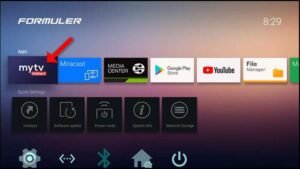
✅ Step 1: Launch MYTV Online 2
-
Open the exclusive IPTV application on your Formuler box: MYTV Online 2.
-
If it’s not already installed, download it from the Google Play Store.
💡 Pro Tip:
For the best IPTV streaming experience, always use a stable internet connection and a reliable IPTV provider.
If you want the best IPTV subscription and full setup guide, visit our official website:
https://forceiptv.com/
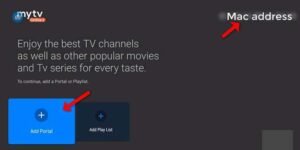
✅ Step 2: Locate Your Device MAC Address
-
You’ll see the MAC address displayed at the top right corner of the screen.
-
📌 Important: Provide this MAC address to your IPTV provider if you’re using the MAC-based Portal option.
✅ Step 3: Add a Portal
-
On the main screen, you’ll see two setup options. Choose “Add Portal” to use your device in MAC-based mode (similar to MAG boxes).
-
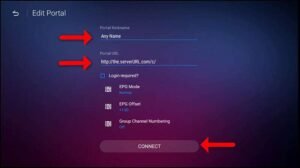
Fill in the following:
-
Portal Nickname: (e.g.,
MYIPTV) -
Portal URL: (This is provided by your IPTV service provider)
-
-
Click “CONNECT” to proceed.
✅ Step 4: Start Watching
-
If the connection is successful, your device will load all the IPTV channels included in your subscription.
-
⏳ Note: Loading the full channel list may take a few moments.
- Frequently Asked Questions About IPTV
What is IPTV?
IPTV is a system that allows you to stream TV channels over the internet.Is IPTV compatible with Smart TVs?
Yes, IPTV works with Smart TVs, Android TV, Firestick, and many streaming devices.What internet speed is needed for IPTV?
A minimum speed of 15 Mbps is recommended for HD streaming.Last Updated: March 2026
